ASP.NET怎么操作DataTable实例应用
390人浏览 / 0人评论
有机会在博客园的博问频道上看到一个问题,《ASP.NET怎么操作DataTable》:
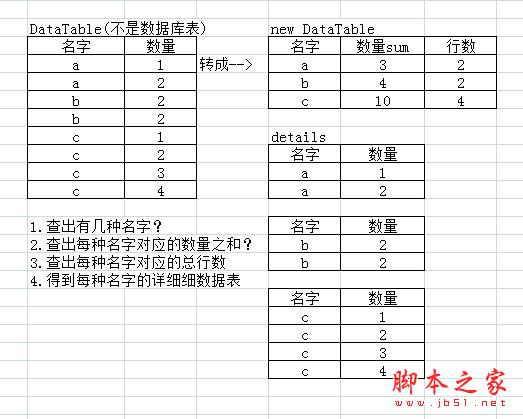
如上图,左边的这个表是程序构建出来的,不是数据库表,怎么通过操作DataTable手段得到右边的四个表?
Insus.NET尝试做了一下,算是练习DataTable的功力了。效果如下:
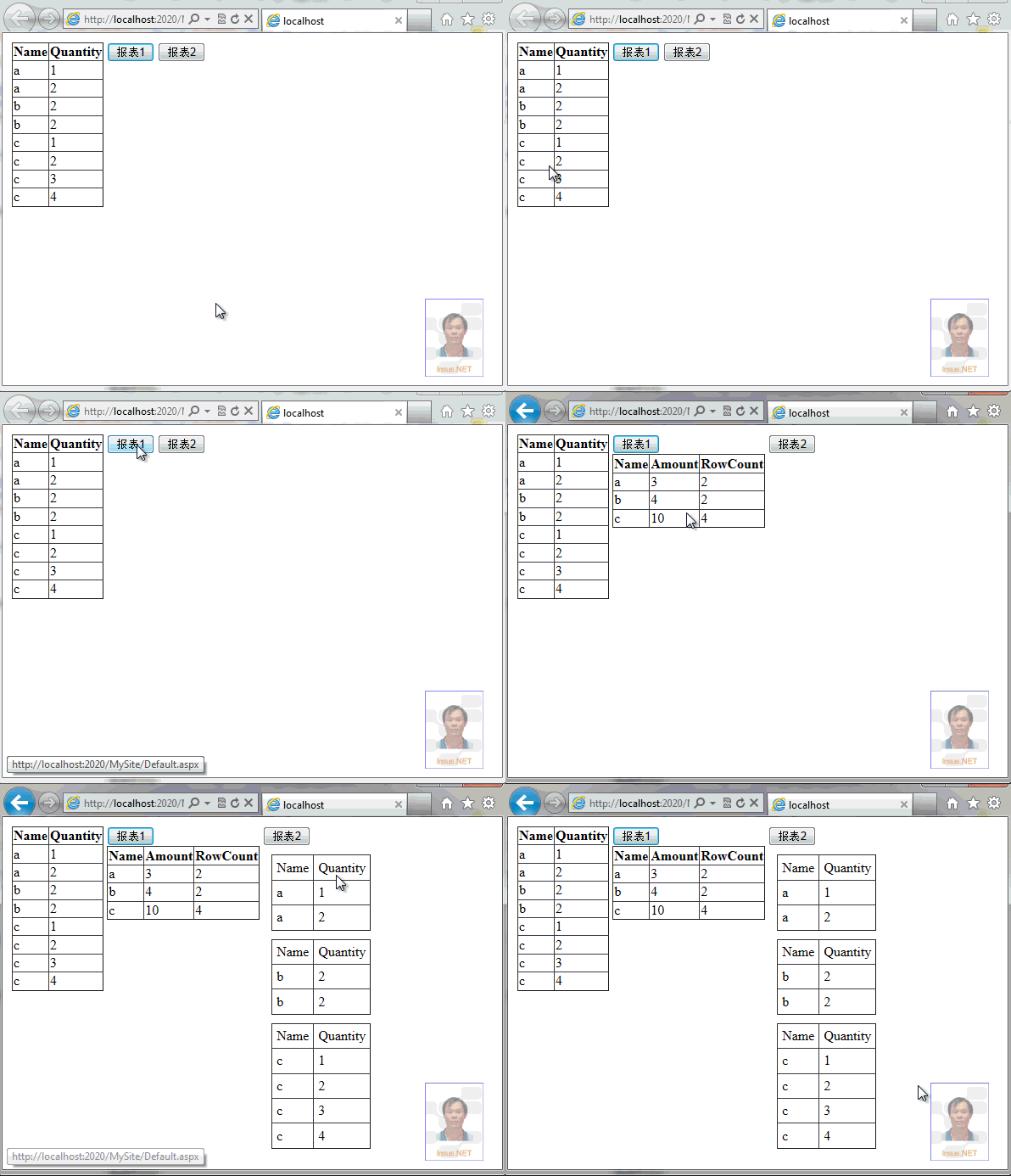
根据最初数据,Insus.NET在.aspx内放置了一个Gridview,用来显示最开始的数据。
View Code
Name
Quantity
创建一个DataTable,并填充数据:
View Code
DataTable GetData()
{
DataTable table = new DataTable();
table.Columns.Add("Name", typeof(string));
table.Columns.Add("Quantity", typeof(int));
table.Rows.Add("a", 1);
table.Rows.Add("a", 2);
table.Rows.Add("b", 2);
table.Rows.Add("b", 2);
table.Rows.Add("c", 1);
table.Rows.Add("c", 2);
table.Rows.Add("c", 3);
table.Rows.Add("c", 4);
return table;
}
然后为刚才创建的Gridview绑定这个DataTable:
View Code
protected void Page_Load(object sender, EventArgs e)
{
if (!IsPostBack)
{
Data_Binding();
}
}
private void Data_Binding()
{
this.GridView1.DataSource = GetData();
this.GridView1.DataBind();
}
为了得到报表1,它有三个字段,名称(Name),数量(Amount)和行数(Rowcount),Insus.NET还参考源数据,它还有一个数量(Quantity)字段。因此,Insus.NET写了一个类别Item,为以下导出报表作准备:
Item
using System;
using System.Collections.Generic;
using System.Linq;
using System.Web;
///
/// Summary description for Item
///
namespace Insus.NET
{
public class Item
{
private string _Name;
private int _Quantity;
private int _Amount;
private int _RowCount;
public string Name
{
get { return _Name; }
set { _Name = value; }
}
public int Quantity
{
get { return _Quantity; }
set { _Quantity = value; }
}
public int Amount
{
get { return _Amount; }
set { _Amount = value; }
}
public int RowCount
{
get { return _RowCount; }
set { _RowCount = value; }
}
public Item()
{
//
// TODO: Add constructor logic here
//
}
public Item(string name, int quantity)
{
this._Name = name;
this._Quantity = quantity;
}
public Item(string name, int amount,int rowCount)
{
this._Name = name;
this._Amount = amount;
this._RowCount = rowCount;
}
}
}
OK,现在我们写一个报表,在.aspx放在一个按钮,以及一个GridView,来显示报表,注意一个字段的绑定。
View Code
Name
Amount
RowCount
在.cs 写click事件:
View Code
protected void ButtonReport1_Click(object sender, EventArgs e)
{
SortedList _sl = new SortedList();
DataTable otable = GetData();
foreach (DataRow dr in otable.Rows)
{
if (_sl.ContainsKey(dr["Name"].ToString()))
{
_sl[dr["Name"].ToString()].Amount += Convert.ToInt32(dr["Quantity"]);
_sl[dr["Name"].ToString()].RowCount += 1;
}
else
{
Item i = new Item(dr["Name"].ToString(), Convert.ToInt32(dr["Quantity"]), 1);
_sl.Add(dr["Name"].ToString(), i);
}
}
this.GridView2.DataSource = _sl.Values;
this.GridView2.DataBind();
}
第一份报表,大功告成,只要DataTable数源数据有变化,报表也会随之变化。
接下来,完成第二个报表,在Insus.NET使用Repeater包含Repeater来实现。因此,前台Html代码如下,其中第一个Repeate内放置了一个HiddenField,来存储名称(Name)字段,当作子Repeater的参考传入。
View Code
首先,我们需要从DataTable,获取名称(Name)唯一的记录存储起来,作为第一个Repeate控件的数据集数据源。
View Code
protected void ButtonReport2_Click(object sender, EventArgs e)
{
this.Repeater1.DataSource = Names();
this.Repeater1.DataBind();
}
List Names()
{
List t = new List();
DataTable otable = GetData();
foreach (DataRow dr in otable.Rows)
{
if (!t.Contains(dr["Name"].ToString()))
t.Add(dr["Name"].ToString());
}
return t;
}
我们还要写第二个Repeater控件的数据源:
View Code
List GetDataByName(string name)
{
List o = new List();
DataTable otable = GetData();
foreach (DataRow dr in otable.Rows)
{
if (name == dr["Name"].ToString())
{
Item i = new Item(dr["Name"].ToString(), Convert.ToInt32(dr["Quantity"]));
o.Add(i);
}
}
return o;
}
为第二个Repeater控件绑定数据源,在绑写之前,得先找到这个控件,因此,你需要在第一个Repeater控件写OnItemDataBound="Repeater1_ItemDataBound"事件:
View Code
protected void Repeater1_ItemDataBound(object sender, RepeaterItemEventArgs e)
{
if (e.Item.ItemType == ListItemType.Item || e.Item.ItemType == ListItemType.AlternatingItem)
{
if (e.Item.FindControl("HiddenField1") != null && e.Item.FindControl("Repeater2") != null)
{
var hiddenField = e.Item.FindControl("HiddenField1") as HiddenField;
var repeater = e.Item.FindControl("Repeater2") as Repeater;
repeater.DataSource = GetDataByName(hiddenField.Value);
repeater.DataBind();
}
}
}
如上图,左边的这个表是程序构建出来的,不是数据库表,怎么通过操作DataTable手段得到右边的四个表?
Insus.NET尝试做了一下,算是练习DataTable的功力了。效果如下:
根据最初数据,Insus.NET在.aspx内放置了一个Gridview,用来显示最开始的数据。
复制代码 代码如下:
View Code
Name
Quantity
创建一个DataTable,并填充数据:
复制代码 代码如下:
View Code
DataTable GetData()
{
DataTable table = new DataTable();
table.Columns.Add("Name", typeof(string));
table.Columns.Add("Quantity", typeof(int));
table.Rows.Add("a", 1);
table.Rows.Add("a", 2);
table.Rows.Add("b", 2);
table.Rows.Add("b", 2);
table.Rows.Add("c", 1);
table.Rows.Add("c", 2);
table.Rows.Add("c", 3);
table.Rows.Add("c", 4);
return table;
}
然后为刚才创建的Gridview绑定这个DataTable:
复制代码 代码如下:
View Code
protected void Page_Load(object sender, EventArgs e)
{
if (!IsPostBack)
{
Data_Binding();
}
}
private void Data_Binding()
{
this.GridView1.DataSource = GetData();
this.GridView1.DataBind();
}
为了得到报表1,它有三个字段,名称(Name),数量(Amount)和行数(Rowcount),Insus.NET还参考源数据,它还有一个数量(Quantity)字段。因此,Insus.NET写了一个类别Item,为以下导出报表作准备:
复制代码 代码如下:
Item
using System;
using System.Collections.Generic;
using System.Linq;
using System.Web;
///
/// Summary description for Item
///
namespace Insus.NET
{
public class Item
{
private string _Name;
private int _Quantity;
private int _Amount;
private int _RowCount;
public string Name
{
get { return _Name; }
set { _Name = value; }
}
public int Quantity
{
get { return _Quantity; }
set { _Quantity = value; }
}
public int Amount
{
get { return _Amount; }
set { _Amount = value; }
}
public int RowCount
{
get { return _RowCount; }
set { _RowCount = value; }
}
public Item()
{
//
// TODO: Add constructor logic here
//
}
public Item(string name, int quantity)
{
this._Name = name;
this._Quantity = quantity;
}
public Item(string name, int amount,int rowCount)
{
this._Name = name;
this._Amount = amount;
this._RowCount = rowCount;
}
}
}
OK,现在我们写一个报表,在.aspx放在一个按钮,以及一个GridView,来显示报表,注意一个字段的绑定。
复制代码 代码如下:
View Code
Name
Amount
RowCount
在.cs 写click事件:
复制代码 代码如下:
View Code
protected void ButtonReport1_Click(object sender, EventArgs e)
{
SortedList _sl = new SortedList();
DataTable otable = GetData();
foreach (DataRow dr in otable.Rows)
{
if (_sl.ContainsKey(dr["Name"].ToString()))
{
_sl[dr["Name"].ToString()].Amount += Convert.ToInt32(dr["Quantity"]);
_sl[dr["Name"].ToString()].RowCount += 1;
}
else
{
Item i = new Item(dr["Name"].ToString(), Convert.ToInt32(dr["Quantity"]), 1);
_sl.Add(dr["Name"].ToString(), i);
}
}
this.GridView2.DataSource = _sl.Values;
this.GridView2.DataBind();
}
第一份报表,大功告成,只要DataTable数源数据有变化,报表也会随之变化。
接下来,完成第二个报表,在Insus.NET使用Repeater包含Repeater来实现。因此,前台Html代码如下,其中第一个Repeate内放置了一个HiddenField,来存储名称(Name)字段,当作子Repeater的参考传入。
复制代码 代码如下:
View Code
| Name | Quantity |
首先,我们需要从DataTable,获取名称(Name)唯一的记录存储起来,作为第一个Repeate控件的数据集数据源。
复制代码 代码如下:
View Code
protected void ButtonReport2_Click(object sender, EventArgs e)
{
this.Repeater1.DataSource = Names();
this.Repeater1.DataBind();
}
List Names()
{
List t = new List();
DataTable otable = GetData();
foreach (DataRow dr in otable.Rows)
{
if (!t.Contains(dr["Name"].ToString()))
t.Add(dr["Name"].ToString());
}
return t;
}
我们还要写第二个Repeater控件的数据源:
复制代码 代码如下:
View Code
List GetDataByName(string name)
{
List o = new List();
DataTable otable = GetData();
foreach (DataRow dr in otable.Rows)
{
if (name == dr["Name"].ToString())
{
Item i = new Item(dr["Name"].ToString(), Convert.ToInt32(dr["Quantity"]));
o.Add(i);
}
}
return o;
}
为第二个Repeater控件绑定数据源,在绑写之前,得先找到这个控件,因此,你需要在第一个Repeater控件写OnItemDataBound="Repeater1_ItemDataBound"事件:
复制代码 代码如下:
View Code
protected void Repeater1_ItemDataBound(object sender, RepeaterItemEventArgs e)
{
if (e.Item.ItemType == ListItemType.Item || e.Item.ItemType == ListItemType.AlternatingItem)
{
if (e.Item.FindControl("HiddenField1") != null && e.Item.FindControl("Repeater2") != null)
{
var hiddenField = e.Item.FindControl("HiddenField1") as HiddenField;
var repeater = e.Item.FindControl("Repeater2") as Repeater;
repeater.DataSource = GetDataByName(hiddenField.Value);
repeater.DataBind();
}
}
}
您可能感兴趣的文章:
- asp.net实现导出DataTable数据到Word或者Excel的方法
- asp.net实现数据从DataTable导入到Excel文件并创建表的方法
- Asp.net中DataTable导出到Excel的方法介绍
- asp.net 读取Excel数据到DataTable的代码
- ASP.NET DataTable去掉重复行的2种方法
- ASP.NET中DataTable与DataSet之间的转换示例
- Asp.net下使用Jquery Ajax传送和接收DataTable的代码
- asp.net 数据库的连接和datatable类
- Asp.net静态方法之Grid转DataTable方法实现步骤
- Asp.net实现选择性的保留DataTable中的列
- asp.net DataTable导出Excel自定义列名的方法



微信公众号

关注微信公众号获取更多VSCode编程信息,定时发布干货文章

全部评论