asp.net中通过DropDownList的值去控制TextBox是否可编写的实现代码
316人浏览 / 0人评论
效果:
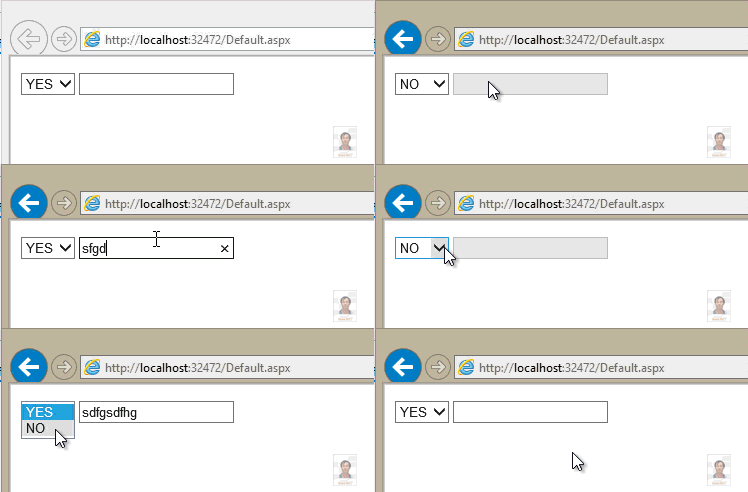
.aspx:
.aspx.cs:
using System;
using System.Collections.Generic;
using System.Data;
using System.Linq;
using System.Web;
using System.Web.UI;
using System.Web.UI.WebControls;
public partial class _Default : System.Web.UI.Page
{
protected void Page_Load(object sender, EventArgs e)
{
if (!IsPostBack)
{
Data_Binding();
}
}
private void Data_Binding()
{
this.DropDownListYesNo.DataSource = GetData().Select(yn => new { value = yn }).ToList();
this.DropDownListYesNo.DataTextField = "value";
this.DropDownListYesNo.DataBind();
}
protected void DropDownList1_SelectedIndexChanged(object sender, EventArgs e)
{
switch (this.DropDownListYesNo.SelectedItem.Text)
{
case "YES":
this.TextBox1.Enabled = true;
break;
case "NO":
this.TextBox1.Enabled = false;
this.TextBox1.Text = string.Empty;
break;
}
}
private List GetData()
{
List yn = new List();
yn.Add("YES");
yn.Add("NO");
return yn;
}
}
.aspx:
复制代码 代码如下:
.aspx.cs:
复制代码 代码如下:
using System;
using System.Collections.Generic;
using System.Data;
using System.Linq;
using System.Web;
using System.Web.UI;
using System.Web.UI.WebControls;
public partial class _Default : System.Web.UI.Page
{
protected void Page_Load(object sender, EventArgs e)
{
if (!IsPostBack)
{
Data_Binding();
}
}
private void Data_Binding()
{
this.DropDownListYesNo.DataSource = GetData().Select(yn => new { value = yn }).ToList();
this.DropDownListYesNo.DataTextField = "value";
this.DropDownListYesNo.DataBind();
}
protected void DropDownList1_SelectedIndexChanged(object sender, EventArgs e)
{
switch (this.DropDownListYesNo.SelectedItem.Text)
{
case "YES":
this.TextBox1.Enabled = true;
break;
case "NO":
this.TextBox1.Enabled = false;
this.TextBox1.Text = string.Empty;
break;
}
}
private List GetData()
{
List yn = new List();
yn.Add("YES");
yn.Add("NO");
return yn;
}
}
您可能感兴趣的文章:
- jquery获取ASP.NET服务器端控件dropdownlist和radiobuttonlist生成客户端HTML标签后的value和text值
- (asp.net c#)DropDownList绑定后显示对应的项的两种方法
- asp.net DropDownList自定义控件,让你的分类更清晰
- asp.net中不能在DropDownList中选择多个项 原因分析及解决方法
- ASP.NET MVC DropDownList数据绑定及使用详解
- ASP.NET笔记之 ListView 与 DropDownList的使用
- ASP.NET服务器端控件RadioButtonList,DropDownList,CheckBoxList的取值、赋值用法
- asp.net mvc下拉框Html.DropDownList 和DropDownListFor的常用方法
- ASP.NET MVC中为DropDownListFor设置选中项的方法
- asp.net DropDownList实现二级联动效果
- ASP.NET中DropDownList下拉框列表控件绑定数据的4种方法
- ASP.NET 2.0中的数据操作之七:使用DropDownList过滤的主/从报表
- ASP.NET 2.0中的数据操作之八:使用两个DropDownList过滤的主/从报表



微信公众号

关注微信公众号获取更多VSCode编程信息,定时发布干货文章

全部评论